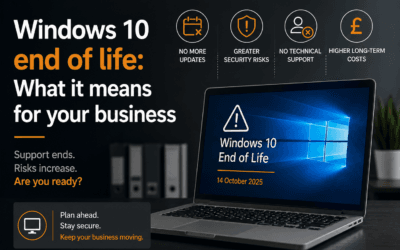

Microsoft will officially end support for Windows 10 on 14 October 2025. After this date, businesses that continue to use Windows 10 will be at risk of security vulnerabilities, software incompatibility, and operational disruptions.
If your organisation still relies on Windows 10, it’s critical to start planning your transition to Windows 11 now. Waiting too long can lead to rushed decisions, unbudgeted costs, and unnecessary downtime. In this article, we’ll explain what the Windows 10 End of Life (EOL) means, why you should act now, and how to assess whether your current PCs are compatible with Windows 11.
What Does “End of Life” Mean for Windows 10?
When Microsoft declares an operating system as End of Life (EOL), it means that it will no longer receive security updates, bug fixes, or technical support. After 14 October 2025, Windows 10 will stop receiving these critical updates, leaving your business vulnerable to cybersecurity risks. Without ongoing support, businesses running Windows 10 will also face compatibility issues, as software vendors gradually stop supporting outdated systems.
Why Should You Start Planning Now?
While October 2025 may seem far off, transitioning an entire business IT infrastructure takes time. Rushing through this process at the last minute can lead to unforeseen costs, downtime, and operational disruptions.
By planning now, you can evaluate your current systems, ensure compatibility with Windows 11, and budget for any necessary upgrades. An early start also gives your team time to adapt to the new system, reducing the risk of productivity loss when the change happens.
Assessing Compatibility: Is Your Current Hardware Ready for Windows 11?
One of the key challenges businesses face when upgrading to Windows 11 is hardware compatibility. Windows 11 has more stringent system requirements than Windows 10, meaning that some older PCs may not be capable of running the new operating system.
Minimum Hardware Requirements for Windows 11
To determine if your current PCs are compatible with Windows 11, you’ll need to ensure they meet Microsoft’s minimum hardware specifications, which include:
- 1 GHz or faster processor with at least 2 cores on a compatible 64-bit processor
- 4 GB of RAM or more
- 64 GB of storage or more
- UEFI firmware with Secure Boot capability
- Trusted Platform Module (TPM) version 2.0
- DirectX 12 compatible graphics with a WDDM 2.0 driver
- 9-inch display with 720p resolution or higher
For many businesses, especially those with older equipment, it’s likely that some devices will not meet these requirements. In such cases, you will need to consider replacing older PCs with newer, Windows 11-compatible devices.
How to Check Compatibility
Microsoft provides a free tool called the PC Health Check app, which allows you to quickly assess whether your existing hardware can support Windows 11. Running this tool on all your business devices will give you a clear picture of where upgrades or replacements are needed.
What If Your PCs Aren’t Compatible?
If the PC Health Check shows that your current hardware doesn’t meet the requirements, you’ll need to plan for hardware replacements before the EOL deadline. The process of replacing PCs can take time, especially if you’re upgrading multiple machines across the business, so it’s crucial to plan early and budget for these upgrades.
Key Considerations When Upgrading
Upgrading your operating system involves more than just installing new software. Here are some important factors to consider as you plan for the Windows 11 transition:
- Hardware compatibility: As mentioned, some older PCs may not support Windows 11, requiring new hardware purchases.
- Licensing costs: You’ll need to account for any licensing fees for the new operating system.
- Employee training: As with any significant technology upgrade, there may be an adjustment period as employees familiarise themselves with the new system.
- Data backups and migration: Before upgrading, ensure that your data is properly backed up, and plan for a smooth migration of files, applications, and settings to the new system.
How Ilkley IT Services Can Help with the Transition
Transitioning from Windows 10 to Windows 11 can feel overwhelming, especially when it comes to assessing hardware, managing software compatibility, and ensuring business continuity. Partnering with Ilkley IT Services will make the process smoother and more efficient.
Expert Audits and Planning
Our expert team at Ilkley IT Services will perform a detailed audit of your existing hardware and software to assess compatibility with Windows 11. They’ll create a tailored plan to ensure a seamless transition, including identifying which PCs need to be replaced and helping you select the right hardware for your needs.
Security and Compliance
Upgrading your systems requires careful attention to cybersecurity. Ilkley IT Services will ensure your upgrade process is secure, protecting sensitive data and ensuring your business complies with relevant regulations.
Ongoing Support
Once the upgrade is complete, we will provide ongoing support, manage updates, troubleshoot, and address any post-migration challenges. This will ensure that your business remains productive and secure as it adjusts to the new system.
Start Preparing Today
The Windows 10 End of Life date is fast approaching, and businesses need to act now to avoid falling behind. Here are some practical steps to take:
- Run the PC Health Check tool on all business devices to determine whether your current PCs are compatible with Windows 11.
- Create a timeline for upgrading any incompatible hardware, ensuring you can complete the transition well before October 2025.
- Consult with us to create a migration plan and ensure your business is ready for the change.
Let Us Help You Prepare for Windows 11
Ilkley IT Services specialises in helping businesses like yours make a smooth and secure transition to Windows 11. We’re here to assist you whether you need to assess your current hardware, plan for upgrades, or manage the migration. Contact us today to schedule a consultation and start preparing for the future.